


Welcome to Gather’s Digital Banking
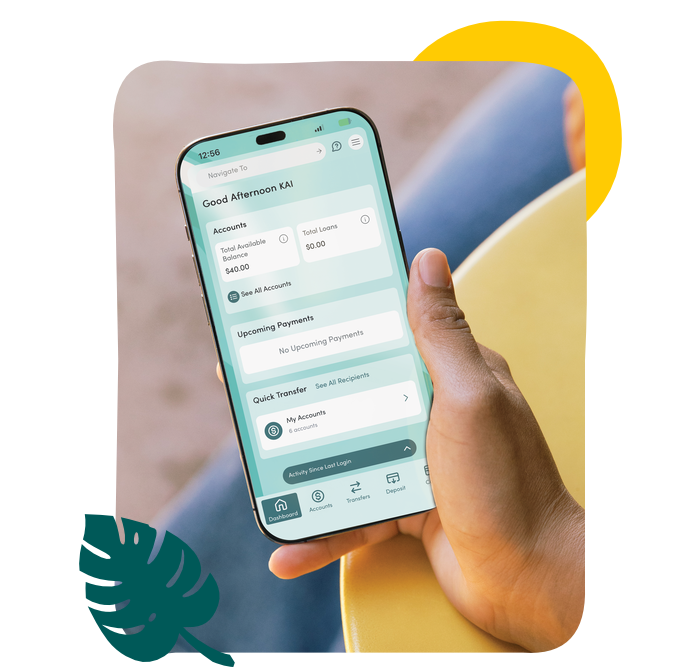
A convenient, secure way to manage your finances—whether you’re at home, at work or on the go. Gather’s Digital Banking brings Online and Mobile Banking together in one easy-to-use experience, giving you convenient access to the tools you need, wherever you are.
Manage Your Money
Through Digital Banking you can do the following:
View Your Accounts
See your account balances, recent transactions, and account details all in one place.
Transfer Money
Move money between your Gather accounts or transfer funds to and from eligible external accounts.
Make Loan Payments
Make loan payments directly through Digital Banking and manage your payment activity.
Account Alerts
Set up alerts to stay informed about account activity, balances, and other important updates.
Customize Your Dashboard
Arrange your dashboard and accounts so the information and tools you use most are easy to find.
More Ways to Bank:
Pay & Deposit
Pay bills, manage loan payments, deposit checks, and explore more payment options.
Cards & Services
Manage your debit card, use Mobile Wallet, access eStatements, and find more ways to bank.
Access Digital Banking
Log In to Digital Banking Online
Download the Gather Mobile App
Biometric Login
Log in to the Gather mobile app using your fingerprint or facial recognition for convenient access to your accounts.
How do I access Digital Banking? Do I need a Different App?
Update the Gather Mobile app when prompted. Its name stays the same, with a refreshed icon and appearance.
What should I have ready for my first login?
Why do I see so many memberships / accounts?
Our upgraded digital banking experience allows you to view accounts that you are a party to, now instead of having separate logins you can now view and manage your accounts all in one place.
Where can I find the link to access my digital banking through my web browser?
Where can I find the link to access my digital banking through my web browser?
Navigate to the “login” option on our website.
Why do I have to enter a Secure Access Code every time I log in?
When you enter your Secure Access Code, we will ask if you would like to trust this device.
- If you select "trust this device" then you no longer need a Secure Access Code for that device. We recommend selecting this option for your personal devices that you frequently use to access your digital banking.
- If you do not select this option, then you will be required to obtain and enter a Secure Access Code each time you login.
Do I need to reset biometric login?
Will my scheduled transfers carry over into the new application?
Will my scheduled transfers carry over into the new application?
No, all scheduled transfers set up with member to member will not be cared over. New scheduled transfers can be set up once logged into the upgraded digital banking application.
Is Zelle® available after the upgrade?
Are we now able to transfer to other banking institutions?
Are we now able to transfer to other banking institutions?
With the transfers tab you can conduct all sorts of transfers ranging from internal member transfers to external transfers to other financial institutions.
Can I still make payments to my loans and credits cards?
Can I still make payments to my loans and credits cards?
Yes, Payments to both can be made my clicking on the loan account and selecting make a payment.
How do I reconnect QuickBooks or Quicken?
What should I know before using Skip-A-Pay?
What happens to my CardControl preferences?
What happens to my Bill Pay information?
How do I activate Mobile Check Deposit?
Can I still deposit my checks remotely?
Can I still deposit my checks remotely?
Yes, our mobile check deposit feature is still available.
Will I need to update existing bill payments?
Will I need to update existing bill payments?
Yes, Bill payments will be carried over.
Where do I go to submit inquiries?
Under additional information, our support messages allow you to submit a ticket to a trusted professional at our help desk.
How can I update my contact information?
How can I update my contact information?
Under user settings, the personal information tab will allow you to update your phone number, email, mail address as well as manage your trusted devices.
Can I customize my alert settings?
Can I customize my alert settings?
Yes, you can customize your notifications and alerts.